All-in-one PC care · v4.22.0

A PC cleaner that
shows its work.

Most cleanup tools invent an error count to scare you into upgrading. OptiGuard scans for specific, provable problems, cites the exact evidence for each one, and keeps a 7-day undo on everything it touches.
PC Health ScoreLive scan
57 4 findings, each with a fix
Firewall profile disabledDomain, Private, Public — Get-NetFirewallProfile
Fix this
18 leftover registry entriesHKLM\...\Uninstall\{Battlefield™ 6} → install path missing
Review
Browser extension, high-risk scopemanifest permission: host_permissions "<all_urls>"
Review
Defender real-time protectionAMServiceEnabled: true — no action needed
OK
Illustrative findings from real diagnostic runs during development — not a scan of your machine.
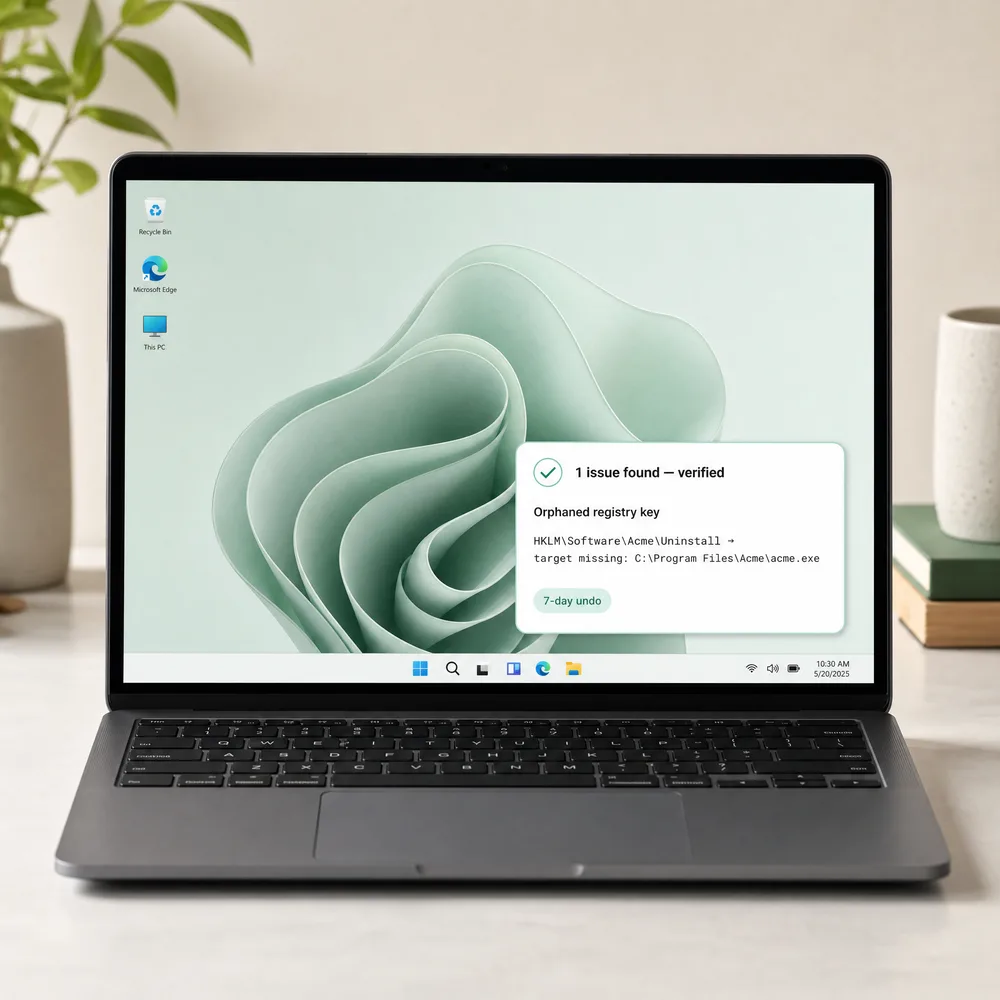
OptiGuard's evidence-based clean scan result, shown as a small precise card over a tidy Windows desktop

Case 01The fear-tactic economy

The market's default is to scare you first.

Independent reviews keep finding the same pattern: cleaners that flag thousands of "critical errors" that aren't real, then gate the fix behind an upgrade. Some "driver updater" tools are outright flagged as malware. OptiGuard was built as the opposite of that playbook.

Typical cleaner

"14,782 errors found — upgrade to fix"

A blind registry sweep flags anything that looks unused, with no evidence and no way to verify a single claim.

— reported pattern, PC-cleaner market review, 2026
OptiGuard

"18 entries — each cites the missing path"

Only registry entries whose install folder, uninstaller, or icon is verifiably gone from disk are flagged. Nothing else.

registry-cleaner.scan() → RegistryCleanerData.cs

Case 02The safety net

Every cleanup has a 7-day undo.

Nothing is deleted outright. Files move to a local quarantine with a manifest recording where they came from — one click restores a whole batch. A Windows System Restore Point is created automatically before higher-risk actions.

$ quarantine.log — bulk cleanup, 300 files
✓ batch 20260910_a3f1 created
✓ 300/300 files moved → quarantine/
✓ manifest written in 213ms (one write per batch, not per file)
$ undo last cleanup
✓ 300/300 files restored to original path
99×
faster batch cleanup after a 2026 perf fix
7 days
undo window before permanent deletion
4 hrs
restore-point cooldown, so cleanup never re-waits

Case 03The toolkit

Seventeen tools, one dossier.

Organized the way you'd actually reach for them — not a flat list of forty icons.

Uninstall

ProgramsNormal, deep, or forced removal — with leftover detection and a local "safe to remove" confidence score
Windows apps & gamesUWP packages, Steam/Epic/GOG titles
Browser extensionsRisk-scored by real manifest permissions

Maintenance

Disk space analyzerDrill into folders, find the 50 largest files
Duplicate finderCompares file content (SHA-1), not just filenames
Junk cleaner & startup managerQuarantined, not deleted outright — with an optional schedule for hands-off cleanup

Security & privacy

Security centerReads real Defender, Firewall & Windows Update status
Privacy dashboard7 toggles — the same registry keys Windows Settings uses
Phishing checkerHeuristic scan for suspicious links and urgency language

Insight

PC health scoreOne number from 7 real signals, each with a fix
Activity timelineAn honest history built from real quarantine & backup records
Device & driver healthReads Device Manager — never downloads a driver

Case 04Deliberately absent

Some "features" we researched and refused to build.

Every omission below was a decision, not an oversight.

✕
Driver auto-updaterA well-documented scareware category — some ship as outright malware. We read Device Manager's real status and point you to Windows Update instead.
✕
"RAM optimizer"Debunked pseudoscience on modern Windows. Force-trimming working sets makes things slower, not faster.
✕
Blind registry sweepThe single biggest cause of "the cleaner broke my PC" complaints across the market.
✕
Inflated error countsNo feature on this page reports a number it can't cite evidence for.

Run the scan. Read the evidence. Decide for yourself.

Free, no account, no telemetry. Everything stays on your machine.

Download OptiGuard →

Case 05Questions people actually ask

FAQ

Is my data sent to the cloud?

No. OptiGuard runs entirely on your PC. The only network calls are an optional update check and phishing-link heuristics — nothing about your files or installed programs is ever uploaded.

Does it need administrator rights?

Yes — registry and Program Files access require it. You'll see one UAC prompt each time it starts.

What happens to files it deletes?

They go to a 7-day local quarantine first, fully recoverable with one click. Nothing is gone for good by accident.

Will it break anything, like registry cleaners used to?

Registry Cleaner only flags entries with concrete proof their target no longer exists, and automatically backs up every change to a .reg file before removing anything.

Is it free?

Yes — no account, no upsells, no bundled software.


Case 06Staying current

Automatic updates, no re-download.

OptiGuard checks GitHub for a newer version a few seconds after it starts (at most once per session, and you can turn it off in Settings). If one's out, you get a quiet, dismissible notification with a link to the release notes — nothing downloads or installs itself. For routine updates you just click through and confirm; no more digging up this page to grab a new installer by hand.

✓
Open source of truthEvery release, and the full version history, lives at github.com/ofirshudari1-ship-it/optiguard.
✓
You're always asked firstThe check itself is silent and read-only. Installing a new version is always your click, never automatic.

טיפול מקיף במחשב · גרסה 4.22.0

מנקה מחשב
שמראה את העבודה שלו.

רוב כלי הניקוי ממציאים מספר שגיאות כדי להפחיד אתכם לשדרוג. OptiGuard סורק בעיות ספציפיות וניתנות להוכחה, מצטט את ההוכחה המדויקת לכל אחת, ושומר אפשרות ביטול של 7 ימים על כל פעולה שהיא נוגעת בה.

ציון בריאות מחשבסריקה חיה
57 4 ממצאים, לכל אחד תיקון
חומת האש מושבתתDomain, Private, Public — Get-NetFirewallProfile
תקן זאת
18 רשומות רישום שאריותHKLM\...\Uninstall\{Battlefield™ 6} → נתיב ההתקנה חסר
סקור
תוסף דפדפן, הרשאות בסיכון גבוהmanifest permission: host_permissions "<all_urls>"
סקור
הגנה בזמן אמת של DefenderAMServiceEnabled: true - אין צורך בפעולה
תקין
ממצאים להמחשה מהרצות אבחון אמיתיות בפיתוח - לא סריקה של המחשב שלכם.
תוצאת סריקה מבוססת-הוכחה של OptiGuard, מוצגת ככרטיס קטן ומדויק מעל שולחן עבודה מסודר

מקרה 01כלכלת ההפחדה

ברירת המחדל של השוק היא להפחיד קודם.

ביקורות עצמאיות ממשיכות למצוא את אותו דפוס: כלי ניקוי שמסמנים אלפי "שגיאות קריטיות" שאינן אמיתיות, ואז חוסמים את התיקון מאחורי שדרוג בתשלום. חלק מכלי "עדכון דרייברים" מסומנים כתוכנה זדונית של ממש. OptiGuard נבנתה כהיפוך מוחלט של השיטה הזו.

כלי ניקוי טיפוסי

"נמצאו 14,782 שגיאות - שדרג כדי לתקן"

סריקת רישום עיוורת מסמנת כל דבר שנראה לא בשימוש, בלי הוכחה ובלי דרך לאמת אף טענה.

- דפוס מדווח, סקירת שוק כלי ניקוי מחשב, 2026
OptiGuard

"18 רשומות - כל אחת מצטטת את הנתיב החסר"

רק רשומות רישום שתיקיית ההתקנה, המסיר או האייקון שלהן נעלמו באופן ניתן לאימות מהדיסק מסומנות. שום דבר אחר.

registry-cleaner.scan() → RegistryCleanerData.cs

מקרה 02רשת הביטחון

לכל ניקוי יש ביטול של 7 ימים.

שום דבר לא נמחק ישירות. קבצים עוברים להסגר מקומי עם מניפסט שמתעד מאיפה הם הגיעו - לחיצה אחת משחזרת אצווה שלמה. נקודת שחזור של Windows נוצרת אוטומטית לפני פעולות בסיכון גבוה יותר.

$ quarantine.log — bulk cleanup, 300 files
✓ batch 20260910_a3f1 created
✓ 300/300 files moved → quarantine/
✓ manifest written in 213ms (one write per batch, not per file)
$ undo last cleanup
✓ 300/300 files restored to original path
פי 99
ניקוי אצווה מהיר יותר אחרי תיקון ביצועים ב-2026
7 ימים
חלון ביטול לפני מחיקה סופית
4 שעות
צינון נקודת שחזור, כך שהניקוי לעולם לא ממתין שוב

מקרה 03ערכת הכלים

שבעה עשר כלים, תיק אחד.

מאורגן בדרך שבה אתם באמת מגיעים אליהם - לא רשימה שטוחה של ארבעים אייקונים.

הסרת תוכנות

תוכנותהסרה רגילה, עמוקה או כפויה - עם זיהוי שאריות וציון ביטחון מקומי "בטוח להסרה"
אפליקציות ומשחקי Windowsחבילות UWP, כותרים מ-Steam/Epic/GOG
תוספי דפדפןדירוג סיכון לפי הרשאות manifest אמיתיות

תחזוקה

מנתח שטח דיסקצלול לתוך תיקיות, מצא את 50 הקבצים הגדולים
מוצא כפילויותמשווה תוכן קובץ (SHA-1), לא רק שמות קבצים
מנקה זבל ומנהל הפעלהמוסגר, לא נמחק ישירות - עם אפשרות לתזמון ניקוי אוטומטי

אבטחה ופרטיות

מרכז אבטחהקורא סטטוס אמיתי של Defender, חומת אש ו-Windows Update
לוח פרטיות7 מתגים - אותם מפתחות רישום ש-Windows Settings משתמש בהם
בודק פישינגסריקה היוריסטית לקישורים חשודים ושפת דחיפות

תובנה

ציון בריאות מחשבמספר אחד מ-7 אותות אמיתיים, לכל אחד תיקון
ציר זמן פעילותהיסטוריה כנה שנבנית מרישומי הסגר וגיבוי אמיתיים
בריאות מכשיר ודרייברקורא את Device Manager - לעולם לא מוריד דרייבר

מקרה 04נעדר בכוונה

כמה "פיצ'רים" שחקרנו וסירבנו לבנות.

כל השמטה למטה הייתה החלטה, לא פספוס.

✕
מעדכן דרייברים אוטומטיקטגוריית scareware מתועדת היטב - חלק נשלחים ממש כתוכנה זדונית. אנחנו קוראים את הסטטוס האמיתי של Device Manager ומפנים אתכם ל-Windows Update במקום.
✕
"מייעל זיכרון RAM"פסאודו-מדע מופרך ב-Windows מודרני. כיווץ כפוי של working sets מאט דברים, לא מזרז.
✕
סריקת רישום עיוורתהגורם המספר אחד ל"הכלי שבר לי את המחשב" בכל השוק.
✕
מספרי שגיאות מנופחיםאף פיצ'ר בעמוד הזה לא מדווח מספר שהוא לא יכול לצטט לו הוכחה.

הרץ את הסריקה. קרא את ההוכחות. תחליטו בעצמכם.

חינם, בלי חשבון, בלי טלמטריה. הכל נשאר במחשב שלכם.

הורד את OptiGuard ←

מקרה 05שאלות שאנשים באמת שואלים

שאלות נפוצות

האם המידע שלי נשלח לענן?

לא. OptiGuard פועלת לגמרי במחשב שלכם. הקריאות היחידות לרשת הן בדיקת עדכונים אופציונלית והיוריסטיקת קישורי פישינג - שום דבר על הקבצים או התוכנות המותקנות שלכם לא מועלה.

האם היא דורשת הרשאות מנהל?

כן - גישה לרישום ול-Program Files דורשת זאת. תראו חלון UAC אחד בכל הפעלה.

מה קורה לקבצים שהיא מוחקת?

הם עוברים קודם להסגר מקומי של 7 ימים, ניתנים לשחזור מלא בלחיצה אחת. שום דבר לא נעלם סופית בטעות.

האם היא תשבור משהו, כמו שניקויי רישום ידעו לעשות בעבר?

ניקוי הרישום מסמן רק רשומות עם הוכחה קונקרטית שהיעד שלהן כבר לא קיים, ומגבה אוטומטית כל שינוי לקובץ .reg לפני הסרה.

האם היא חינמית?

כן - בלי חשבון, בלי הצעות שדרוג, בלי תוכנה נלווית.


מקרה 06נשארים מעודכנים

עדכונים אוטומטיים, בלי הורדה מחדש.

OptiGuard בודקת מול GitHub אם יש גרסה חדשה, כמה שניות אחרי ההפעלה (פעם אחת בלבד לכל הפעלה, וניתן לכבות בהגדרות). אם יש - מוצגת הודעה שקטה וניתנת לסגירה עם קישור להערות ה-release; שום דבר לא מוריד או מתקין את עצמו. לעדכון שגרתי פשוט לוחצים ומאשרים - בלי לחפש שוב את העמוד הזה כדי להביא מתקין חדש ידנית.

✓
מקור פתוח ואמיןכל release, וכל היסטוריית הגרסאות, נמצאים ב-github.com/ofirshudari1-ship-it/optiguard.
✓
תמיד נשאלים קודםהבדיקה עצמה שקטה וקריאה-בלבד. התקנת גרסה חדשה היא תמיד לחיצה שלכם, לעולם לא אוטומטית.